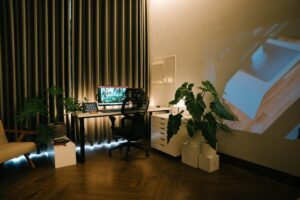

Creating a cozy and inviting home workspace is essential for anyone who spends significant time working from home. A well-designed workspace can boost your focus, reduce stress, and make your workday more enjoyable. Whether you have a dedicated room or just a small corner, there are plenty of ways to transform it into a comfortable and inspiring environment.
In this post, we’ll explore practical tips to help you create a home workspace that feels just right for your needs.
Choose the Right Location
The first step in setting up a cozy workspace is selecting the right spot. Ideally, this area should have:
– Good natural light: Position your desk near a window if possible. Natural light helps reduce eye strain and lifts your mood.
– Minimal distractions: Find a quiet area away from high-traffic spots in your home.
– Adequate space: Ensure you have enough room for your computer, supplies, and any other tools you use regularly.
If space is limited, a corner in your living room or bedroom can work well with some thoughtful planning.
Invest in Comfortable Furniture
Comfort is key to staying focused and productive. Here’s what to consider when choosing your workspace furniture:
– Ergonomic chair: Look for a chair that supports your lower back and promotes good posture.
– Proper desk height: Your desk should allow your arms to rest comfortably with elbows bent at about 90 degrees.
– Versatile surfaces: A desk with drawers or shelves helps keep your workspace organized.
If you prefer standing while working, a height-adjustable desk can offer flexibility and comfort.
Personalize Your Space
Adding personal touches can make your workspace feel warm and inviting. Try some of these ideas:
– Plants: A few small indoor plants can add life and improve air quality.
– Artwork or photos: Display images that make you smile or inspire you.
– Decorative accessories: Use cozy elements like a soft rug, colorful cushions, or a stylish lamp.
Personalization helps make the space feel like your own, reducing stress and increasing motivation.
Optimize Lighting
Proper lighting is crucial for productivity and comfort. Follow these tips:
– Maximize daylight: Use sheer curtains or blinds to control glare while letting in natural light.
– Use layered lighting: Combine overhead lights with task lighting, such as a desk lamp.
– Choose the right bulb: Opt for bulbs with a color temperature between 4000K and 5000K for a bright, neutral light that mimics daylight.
Good lighting reduces eye strain and keeps you alert throughout the day.
Stay Organized
A cluttered workspace can be distracting and overwhelming. Here are some organization tips:
– Use storage solutions: Drawer organizers, shelves, and desk trays keep supplies neat and accessible.
– Create zones: Designate specific areas for different tasks or materials.
– Maintain a daily routine: Spend a few minutes at the end of each day tidying your space.
Keeping your workspace tidy can help clear your mind and promote efficiency.
Incorporate Calming Elements
To enhance the inviting atmosphere, consider including calming elements such as:
– Aroma: Light a scented candle or use an essential oil diffuser with relaxing scents like lavender or eucalyptus.
– Soft textiles: Add a cozy blanket or cushion for comfort during breaks.
– Sound: Play ambient music or white noise to help you focus and minimize distractions.
These small touches create a serene environment that supports your well-being.
Set Boundaries
When working from home, it’s important to establish boundaries to separate work from personal life:
– Define your work hours: Stick to a schedule as much as possible.
– Use physical cues: Close the door to your workspace or use a room divider to signal the start and end of the workday.
– Take breaks: Step away from your desk regularly to refresh your mind.
Clear boundaries help maintain balance and reduce burnout.
Keep Technology in Check
Technology is a big part of any home workspace, but it’s important to use it wisely:
– Organize cables: Use cable clips or sleeves to keep cords tidy and prevent tangling.
– Choose quality accessories: Invest in a good keyboard, mouse, and headset for comfort.
– Limit distractions: Turn off non-work notifications during focus periods.
A streamlined tech setup supports productivity and keeps frustrations at bay.
Final Thoughts
A cozy and inviting home workspace doesn’t require a complete overhaul. With thoughtful choices about location, furniture, lighting, and personalization, you can create a space that feels comfortable and motivating. Remember to keep your workspace organized, introduce calming elements, and set clear boundaries to make your work-from-home life more enjoyable.
Start with small changes and gradually adapt your space as you discover what helps you work best. Your perfect home workspace is within reach!